Oleon
OleonCRM for financial services
The routine, automated. The record, kept.
Rates, requirements, application status, documents and instalment reminders run on their own, on WhatsApp. Every step the bot takes is written down beside the ones your people take, so the conversation a regulator asks for is the one that happened.
Automation
What runs on its own.
Most of a lender's inbox is the same eight jobs.
Rates, requirements, branch hours. Answered from the knowledge base you wrote, in Sinhala, Tamil or English.
Details, asked once. A name, an NIC number, the amount. Each answer checked and saved.
Application status. Looked up in your own system mid-chat, not by a person with two screens.
Documents in the chat. A payslip or an ID copy arrives as a file on the customer's thread.
Payment slips, approved. The team checks the slip, applies a label, and the bot carries on.
Instalment reminders. An approved template to a list. Replies come back to the inbox.
Your core system talks too. Send from your own software through the API, as the same WhatsApp number.
A person, when it matters. Someone is assigned, and the bot stays quiet until they close it.
One application
From first question to final instalment.
Ten steps. Two need a person.
The first question
A customer taps a click-to-WhatsApp ad or the QR code at a branch and asks what a vehicle lease costs. The agent answers from your published rates and requirements, and nothing else.
AI agentThe answer, in the thread, marked as the agent'sEligibility, in four taps
Scout asks for the product, the amount, the monthly income and the type of employment. A condition sends an amount above your limit, or a self-employed applicant, straight to a person.
ScoutEach answer saved, labels such as Leasing and Salaried appliedThe application form
A WhatsApp Form takes the name, NIC number and address on one screen inside WhatsApp. Submitting it starts the next part of the flow, even if the customer wandered off in between.
ScoutThe submission, with every answer the conversation collectedInto your loan system
Scout posts the application to your loan origination system with a web request, carrying the answers and the WhatsApp number. Your system gives it a reference.
ScoutYour systemThe request in the flow's run, the reference saved on the conversationDocuments on the thread
Payslips, an NIC copy, a vehicle quotation. They arrive as files on the customer's own conversation, not in someone's personal phone.
ScoutThe files, append-only, and a Documents in labelWhere is my application?
Asked on day three, day five and day six. Scout looks the reference up in your system each time and answers with the status it finds there.
ScoutYour systemEach lookup and the answer it producedThe decision
When credit approves, your system calls Oleon's API and the approval goes out as an approved WhatsApp template, from the same number the customer has been talking to.
Your systemThe template, its variables and its delivery stateEvery instalment
Reach sends the due-this-week list a reminder template with the amount and date. A customer who replies is back in the shared inbox, with the whole history above them.
ReachDelivery per message, replies in the threadThe payment slip
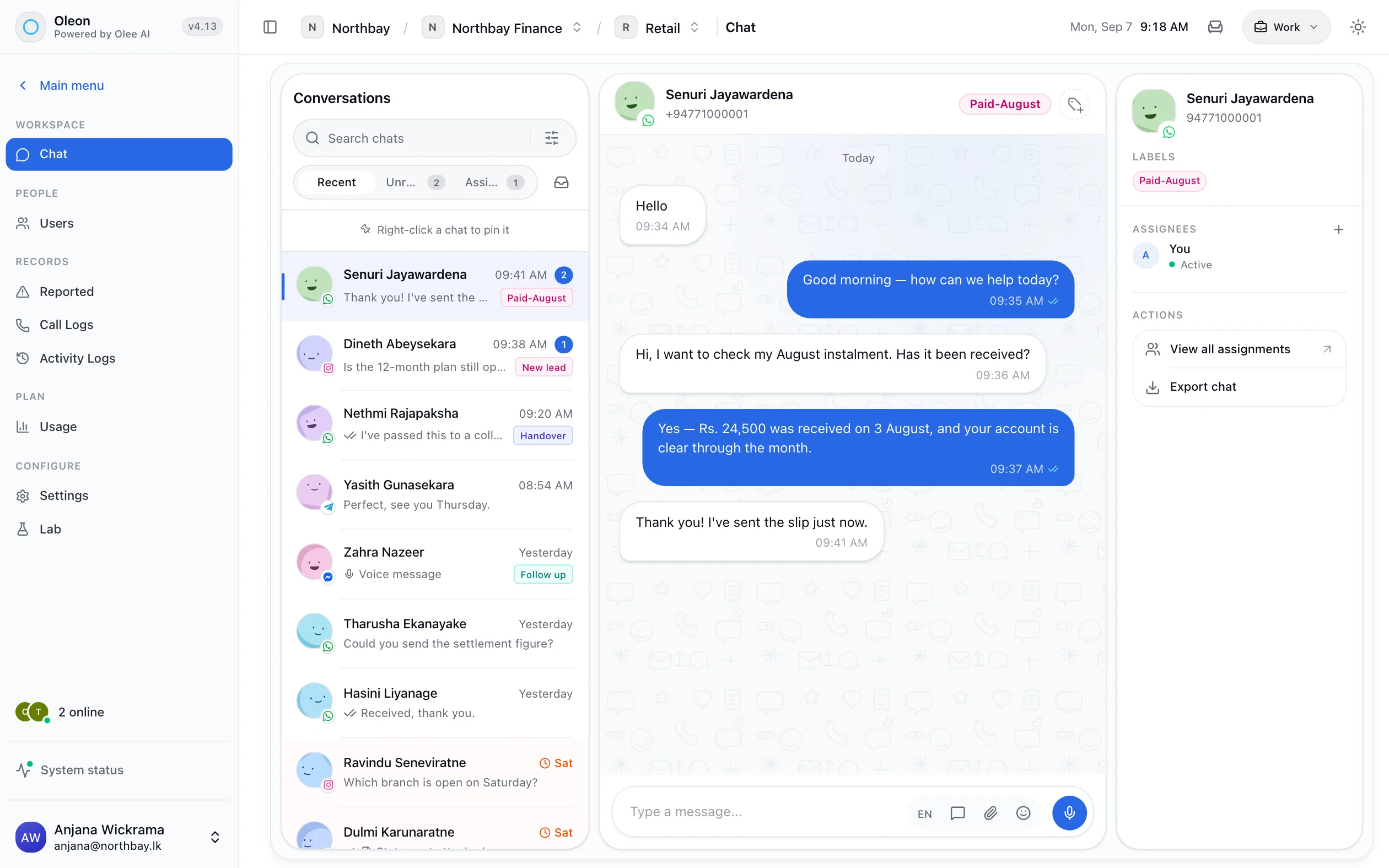
The customer sends a photo of the deposit slip. The bot waits while a person checks it, and carries on the moment they apply the Paid label.
ScoutA personWho approved the slip, and whenHardship, and anything like it
A missed instalment, a request to reschedule, a complaint. These are requested for a person on the collections team, and the bot stays silent until that person closes it.
A personThe assignment, the assignee and every reply
Integration
How it plugs into your systems.
Five wires, and your data stays where it lives.
- Oleon → you
Lookup
Scout asks, mid-conversation
A web request to your endpoint, with the reply mapped into what the bot says. Application status, balance due, next instalment date.
- Oleon → you
Web request from a flow
Scout tells, and moves on
A completed application, a new lead, a callback request, posted to your system as it happens.
- Oleon → you
Webhooks
Oleon tells you a message arrived
Every incoming message, delivered to your own software, for your own records or your own routing.
- You → Oleon
The HTTP API
Your system sends
Approval, disbursement, a due date, a receipt. Sent as a template from your number, by the system that knows it happened.
- You → Oleon
The MCP server
Your own AI reads and acts
An assistant of your own works the inbox through the same permissions a person has, and every tool it calls is logged.
Under the hood
What a status lookup really is.
One step in Bot Studio, and three ways out of it.
Your system answers. Scout does the talking.
The step calls your endpoint with the reference the customer gave, keeps only the fields you map, and puts them into the reply. Your key is added as a secret by our team and never written into the flow. A timeout or an error is its own exit, so a slow core system becomes a handover rather than silence.
The same sentence, every time.
Written once, in your words, with the live values dropped in. No agent paraphrasing a status, and no status read out of a stale spreadsheet.
Where to use it
Four jobs lenders automate first.
Each one a flow you can build in an afternoon.
- Starts with
- An ad, a QR code at the branch, a dealer's referral
- Runs on its own
- Rates, eligibility, the application form, documents, status
- Comes to a person
- Anything outside policy, and the credit decision itself
- Starts with
- Your due list, uploaded or sent from your system
- Runs on its own
- Reminders, balance and due-date lookups, payment slip receipt
- Comes to a person
- Arrears, rescheduling and hardship, every time
- Starts with
- A customer asking today's fixed deposit rates
- Runs on its own
- Rates by term from your knowledge base, maturity reminders, the account-opening form
- Comes to a person
- Which term suits them, which is advice
- Starts with
- A statement request, an address change, a lost card
- Runs on its own
- A WhatsApp Form for the details, posted to your system with a reference
- Comes to a person
- Anything that needs identity checked beyond the form
The boundary
Where the bot stops.
Which is the part a regulator reads.
The agent hands over rather than advising.
It answers from a knowledge base you control and hands to a person when the question is outside it. That boundary is the point: a bot that improvises around a financial product is the risk, not the feature.
Reminders go out without a queue of calls.
A template Meta has approved, sent to a list. Delivery is reported per message, and a customer who replies lands in the shared inbox.
Controls
The rules are yours.
Set by your compliance team, not by the bot.
The agent knows what you wrote
It answers from your knowledge base. Leave advice out of it and advice is never given.
Doubtful replies are flagged
The agent marks answers it is unsure of for review, and they are worked like any report.
Your thresholds, as conditions
An amount, a product, an employment type. Above your line, the flow routes to a person.
Access by role and project
Branch staff, collections and credit see what their role allows, and channels have owners.
Tested before it is live
A test panel and a problems list in Bot Studio. A flow with an error does not publish.
Every version is kept
Each publish is a version you can see and go back to, so a change to a flow is on the record too.
Getting started
Switch it on in this order.
Each step pays for itself before the next.
Answer the questions
Write the rates, requirements and branch details into the knowledge base. The agent takes the repetitive half of the inbox from day one.
Connect one lookup
Give Scout one endpoint for application or loan status. It is the question asked most, and the one people hate answering.
Send the reminders
Get the instalment template approved and send it to this week's list. Replies land in the inbox, not on a branch phone.
Take the application
Eligibility, the form, documents and the post into your loan system, as one flow. The person's time goes to the decision.
Evidence
Automated.
And still on the record.
Messages are only ever added to or marked read. Nothing in the product edits or deletes one, so a thread produced six months later is the thread as it happened.
Labels record who applied them and whether it was a person or the agent. Activity logs record the rest. When an internal review asks who classified an account, there is an answer.
Tech specs
Every one of these is a screen in the product.
- Grounded answers
- Sinhala, Tamil and English
- Lookups to your own system
- Templated sends
- Send from your own system
- Search the whole history
- Labels, with an owner
- Activity logs
- MCP logs
- Assign a conversation
- Hands over to a person
- Roles and access
Questions
Before you ask.
The ones we hear most about CRM for financial services. If yours is not here, the answer is a message away.
What can we automate without a developer?
Answers from your knowledge base, the questions an application starts with, payment slip approvals and handover are all built in Bot Studio without code. Looking up an application's status needs your system to answer a web request, which is usually one endpoint.
Can conversation history be exported for an audit?
Yes. The API is the source of truth for history and search, and records are held per project rather than only in a browser.
Can we stop the AI agent answering certain questions?
The agent answers from the knowledge base you fill in and hands over when a question falls outside it, so scope is set by what you put in rather than by blocklists.
Who can see a customer conversation?
Access is scoped by organisation, project and role, and channels have explicit owners.
Keep exploring.
More of what Oleon does.
All industriesIt starts with one conversation.
Bring the channels you already answer on into one place, and see what the rest of the week looks like.
Not ready to sign up? Join the waitlist and we will come to you.